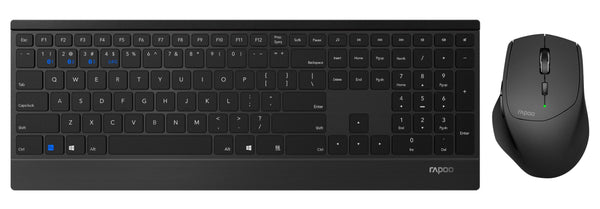
3Dconnexion Keyboard Pro with Numpad
- Vendor3Dconnexion


Description
3Dconnexion Keyboard Pro with Numpad
Wired USB keyboard with wireless numeric keypad
The 3Dconnexion Keyboard Pro with a separate numeric keypad was designed to assist you in creating digital 3D models and professional designs. The compact form factor leaves more room to optimally position your mouse and pen. Twelve programmable 3Dconnexion keys provide quick access to frequently used, application-specific commands – saving time and helping you focus on what matters.
3Dconnexion keys that adapt to your application
The 3Dconnexion Keyboard Pro features twelve additional function keys located above the standard keys. The keyboard instantly recognizes which applications and environments you are currently working in. The keys come pre-assigned with frequently used commands, giving you direct access to essential functions. You can also easily customize the 3Dconnexion keys according to your preferences.
Precise and comfortably light typing
The keyboard and numeric keypad feature concave keycaps ergonomically designed to fit the shape of your fingertips. Even if you do not strike the keys exactly in the center: the matte-coated surfaces and rounded edges always ensure precise input and a pleasant typing feel. Thanks to advanced scissor technology, the keys are characterized by stability and a smooth keystroke. The keycaps are laser-engraved, making the lettering absolutely durable.
High-quality wrist support
With its large-format palm rest, the 3Dconnexion Keyboard Pro provides exactly the support you need to relieve pressure on your wrists. It features a sleek design: lying flat on the desk, it enables relaxed and easy typing. With the help of deployable feet, you can also set the keyboard to an angle of 4.3 degrees as desired.
Secure connection
The wired connection and encrypted communication between the keyboard and numeric keypad meet the highest corporate security requirements. Using the integrated wireless hub, you can easily and quickly connect all your 3Dconnexion wireless devices. This ensures a tidy desk at all times.
Optimize your desktop setup
The separate numeric keypad gives you more flexibility for your desktop setup: place your CadMouse and SpaceMouse exactly as you prefer and as is beneficial for your respective tasks.
USB connection: reliable and uncomplicated
The classic among connection options: This input device is connected to your computer and powered via a USB cable. Plug it in and get started – plug&play convenience makes it possible. Empty batteries or radio signal interference caused by obstacles will never be a problem with this type of connection.
Compatible only with Windows PCs. macOS and Linux are not supported!
Specifications
- Systemvoraussetzungen:
- Betriebssystem: Windows 11, Windows 10, Windows 8.1
- Lieferumfang:
- Tastatur, Ziffernblock, USB-A Verbindungs-Kabel (Für Tastatur), USB-C-Ladekabel (Für Ziffernblock)
- Schnittstelle:
- USB-A
- Tastatur Typ:
- CAD
- Tastatur Features:
- Handgelenkauflage, Hotkeys, Programmierbare Tasten, Ziffernblock
- Ziffernblock:
- Ja
- Verbindungsart:
- Verkabelt
- Tastaturlayout:
- QWERTZ (CH)
- Detailfarbe:
- Schwarz
- Tiefe:
- 229 mm
- Breite:
- 114 mm, 366 mm
- Höhe:
- 16 mm
- Material:
- Kunststoff
- Keyboard Tasten:
- Chiclet (Notebook)
- Gewicht:
- 250 g, 880 g
3Dconnexion Keyboard Pro with Numpad
- Vendor3Dconnexion
94.20
USB keyboard with ergonomically shaped keycaps and advanced scissor technology | Keyboard Pro with a secure connection via USB-A cable, Numpad Pro with an encrypted connection via 2.4 GHz wireless technology or Bluetooth | Comfortable wrist rest for better support while typing | Matte-coated keys for a precise and pleasantly light feel | 3Dconnexion keys can be individually customized | Wireless numeric keypad (with 9 programmable keys) and status display
Description
3Dconnexion Keyboard Pro with Numpad
Wired USB keyboard with wireless numeric keypad
The 3Dconnexion Keyboard Pro with a separate numeric keypad was designed to assist you in creating digital 3D models and professional designs. The compact form factor leaves more room to optimally position your mouse and pen. Twelve programmable 3Dconnexion keys provide quick access to frequently used, application-specific commands – saving time and helping you focus on what matters.
3Dconnexion keys that adapt to your application
The 3Dconnexion Keyboard Pro features twelve additional function keys located above the standard keys. The keyboard instantly recognizes which applications and environments you are currently working in. The keys come pre-assigned with frequently used commands, giving you direct access to essential functions. You can also easily customize the 3Dconnexion keys according to your preferences.
Precise and comfortably light typing
The keyboard and numeric keypad feature concave keycaps ergonomically designed to fit the shape of your fingertips. Even if you do not strike the keys exactly in the center: the matte-coated surfaces and rounded edges always ensure precise input and a pleasant typing feel. Thanks to advanced scissor technology, the keys are characterized by stability and a smooth keystroke. The keycaps are laser-engraved, making the lettering absolutely durable.
High-quality wrist support
With its large-format palm rest, the 3Dconnexion Keyboard Pro provides exactly the support you need to relieve pressure on your wrists. It features a sleek design: lying flat on the desk, it enables relaxed and easy typing. With the help of deployable feet, you can also set the keyboard to an angle of 4.3 degrees as desired.
Secure connection
The wired connection and encrypted communication between the keyboard and numeric keypad meet the highest corporate security requirements. Using the integrated wireless hub, you can easily and quickly connect all your 3Dconnexion wireless devices. This ensures a tidy desk at all times.
Optimize your desktop setup
The separate numeric keypad gives you more flexibility for your desktop setup: place your CadMouse and SpaceMouse exactly as you prefer and as is beneficial for your respective tasks.
USB connection: reliable and uncomplicated
The classic among connection options: This input device is connected to your computer and powered via a USB cable. Plug it in and get started – plug&play convenience makes it possible. Empty batteries or radio signal interference caused by obstacles will never be a problem with this type of connection.
Compatible only with Windows PCs. macOS and Linux are not supported!